

On this page (11)
- 01The short answer
- 02Six author sites at a glance
- 03James Clear: give away a sample, up front
- 04Oliver Burkeman: let the new book lead
- 05Adam Grant: a page for every title, a shop for every market
- 06Tiago Forte: tell new readers where to begin
- 07Cal Newport: group the books, split the audiences
- 08Jay Yang: let the book recruit the reader
- 09Where author sites usually go wrong
- 10Which ideas to borrow first
- 11Where to start
Most lists of author website examples are novelists: moody covers, a series reading order, a countdown to the next release. Useful if you write thrillers. Less useful if your book is about habits, leadership or how to run a company, and its real job is to bring you readers who later book a talk, join a course or hire you.
So this list is only non-fiction and business authors. Six sites, what each one does that most author sites do not, and the one idea worth taking from each. One of them is a site we built. We say which.
The short answer
A non-fiction author's website has one job the book cannot do on its own: turn somebody who read you into somebody you can reach again. The good ones do three things before the visitor scrolls far:
- They lead with the reader's outcome or the book, not a biography.
- They give a real reason to leave an email address, worth more than "get updates": a chapter, a course, sometimes the whole book.
- They give every other visitor a door: the event planner, the journalist, the company that wants to hire them.
Then each of them does one thing better than the rest, and that is the part to borrow. What belongs on an author website in the first place is covered on our author websites page. This piece is about how six authors actually do it.
Six author sites at a glance
| Site | What the book leads to | What it does well | Steal this |
|---|---|---|---|
| James Clear | A newsletter, an app, talks | Trades a chapter for an email in the first screen | Give away a sample, up front |
| Oliver Burkeman | A newsletter, events | Lets the new book be the homepage | Let the new book lead |
| Adam Grant | Talks, a podcast, a newsletter | Gives every book its own page and every market its shop | A page per title, every retailer |
| Tiago Forte | Courses and a newsletter | Tells new readers where to begin | A start here page |
| Cal Newport | A newsletter, a podcast, a day job | Keeps two audiences apart on one page | Group the books, split the audiences |
| Jay Yang | A newsletter and an agency | Gives both books away | Let the book recruit the reader |
James Clear: give away a sample, up front
The first thing on jamesclear.com is not his name. It is the reader's outcome: "An Easy & Proven Way to Build Good Habits & Break Bad Ones". Directly under it, an offer to download the first chapter of Atomic Habits, with the form right there in the first screen.
That is a trade almost every reader of the book's category will take. The visitor gets something real, the author gets an email address, and the chapter does the selling for the book better than any blurb could.
Further down there is a second, deeper offer: a free email course of eleven lessons, one every three days for a month, with a 20-page workbook. Two offers sized to two levels of interest. The homepage also lists the three latest newsletter issues with their dates, which quietly proves the list is alive.
Steal this: put a sample of the book in the first screen and ask for the email address in exchange. A chapter is worth more to a stranger than any amount of "join my list".
Oliver Burkeman: let the new book lead
Oliver Burkeman's site opens on the new book, not on him. The first screen is Meditations for Mortals, one line on what it does for the reader, two blurbs from people his readers already trust, and the markets it is on sale in: the US, the UK, Canada, Australia and New Zealand.
That last line is the detail most authors miss. A reader in Toronto or Sydney who lands on a page with one American retailer assumes the book is not for them. Burkeman's book page lists shops country by country, so nobody has to guess.
His older books are still one click away in the navigation. They have simply stepped back while the new one is out.
Steal this: in a launch year, make the new book the homepage. Say plainly where it is on sale, and link a shop in every one of those places. When the launch is over, the book steps back and your name comes forward again.
Adam Grant: a page for every title, a shop for every market
Adam Grant has five books on his site, and each one has its own page. That sounds obvious until you count how many authors with a backlist give the older titles a thumbnail on a shelf and nothing else.
The page for his newest book links to more than a dozen shops: Amazon in three countries, Barnes & Noble, Bookshop.org, Apple Books, Audible, Indigo, Waterstones and his publisher in four markets. A reader who prefers audio, or a local shop, or lives in Canada, finds their shop without leaving.
The first screen is three tiles, talks, books and podcasts, which sorts visitors by what they came for before they have to read anything. Speaking enquiries go straight to his bureau, which tells planners who to talk to without a single form.
Steal this: give every book its own page, including the old ones, and put every shop a reader might use on it. Each page is one more way to be found by somebody searching for the title.
Tiago Forte: tell new readers where to begin
Forte Labs is the site of a writer with years of articles, three books and paid courses. That much material is a problem for a first-time visitor, who has no idea where to start. So the first item in the navigation is "Start Here".
The newsletter pitch is the other thing worth studying. It says how many people read it, what it is about, and which day it arrives, and it gives something on the spot: his top ten articles of all time, sent straight away. A specific promise beats a vague one every time.
His books link out to sites of their own, and the newest offers bonuses for ordering. That is the exception to the usual advice, and it works here because each title is run as a large launch with its own campaign. For most authors, one site with a page per book is the better choice.
Steal this: if you have more than a year of writing online, add a start here page. Pick the five pieces that best explain your thinking, in reading order, and put the link first in the navigation.
Cal Newport: group the books, split the audiences
Cal Newport has two audiences who want different things: readers of his books, and fellow academics who want his research. His homepage serves both without mixing them. One part is "Cal the Writer", with the books, the newsletter and the podcast. The other is "Cal the Academic", with the scholarship and the CV.
The books are grouped too. Three of them sit together as "The Technology and Culture Trilogy", which tells a new reader they belong together and suggests where to go after the first. The newsletter offers no free gift at all. The essays are the offer, and the pitch says so: an essay in your inbox every week.
Steal this: if your books share a theme, name the set and show them together, so a reader who finished one knows which to read next. And if two different kinds of people visit, give each a section of their own rather than one page trying to suit both.
Jay Yang: let the book recruit the reader
This one is ours. We rebuilt Jay Yang's site and shipped it in seven days. Jay is the author of You Can Just Do Things, a number one Amazon bestseller with a foreword by Noah Kagan, and his newer book, Work With The Best.
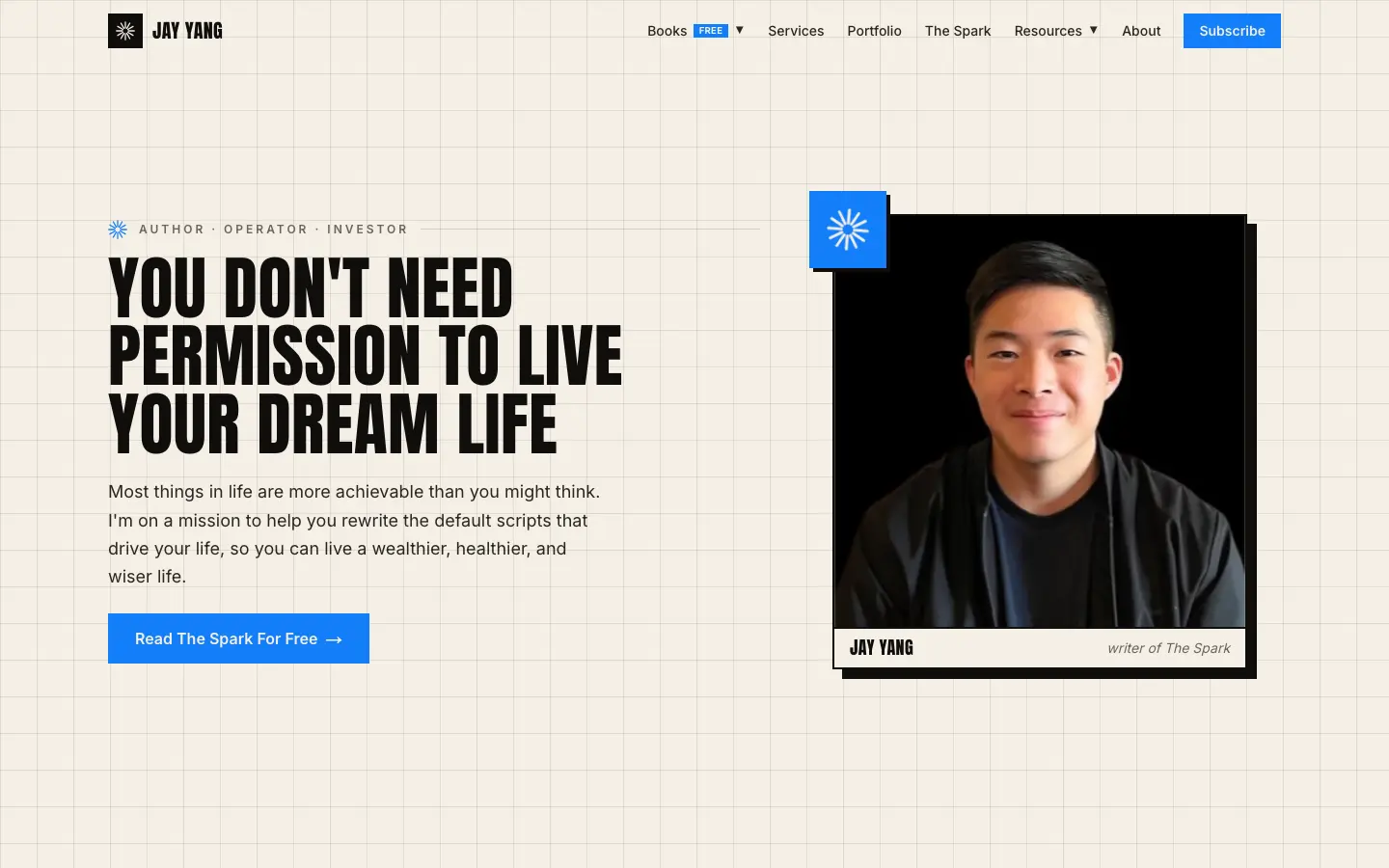
His books are not the product. The newsletter and the agency are. So the first screen leads with the newsletter and says how many people already read it, and the book pages do something most authors would never dare: they give the whole book away, as a free PDF and EPUB, alongside the Amazon link. The page explains why, in his own voice, pointing to the free Almanack of Naval he read in high school.
When the book's job is to recruit readers for something else, every barrier between a stranger and the book costs you a reader. Giving it away removes the last one. What we changed, and why, is written up in the Jay Yang case study.
Steal this: decide what your book is for. If it is the product, sell it everywhere. If it is the way in, think about how much of it you can give away.
Where author sites usually go wrong
Looking at enough author sites, the same few problems keep coming back:
| What we see | What it costs |
|---|---|
| A biography where the book should be | The reader has to scroll to find what they came for |
| One retailer, in one country | Everybody outside it, and everybody who wants audio |
| "Sign up for updates" with no reason | Almost nobody signs up for updates |
| Older books with no page of their own | Every search for those titles goes to a retailer instead |
| No route for planners or press | They email, wait, and book somebody easier |
| A copyright line several years old | The site looks abandoned even when it is not |
None of them is expensive to fix. All of them are expensive to leave.
Which ideas to borrow first
It depends on what the book is for. Pick the row that matches yours:
| If the book's main job is | Borrow from |
|---|---|
| Growing a newsletter | James Clear and Jay Yang |
| Selling the new title in a launch year | Oliver Burkeman |
| Filling a speaking calendar | Adam Grant |
| Leading readers into courses | Tiago Forte |
| Sitting alongside a day job or a second career | Cal Newport |
Borrow one or two ideas, not all six. A site that tries every trick at once ends up with six calls to action and a reader who takes none of them.
Where to start
If your site has a biography where the book should be, start there. Then the email offer, then a page for each book.
For more examples beyond authors, our personal website examples look at consultants, coaches and speakers. If you would rather have it built, that is what our author websites are, from a one page site for a single book to a full site with a page per title, a press kit and an archive you add to yourself. What that costs, in pounds and dollars, is in how much a custom website costs.

Nitesh Padghan
Founder, Storifex Media
I build websites that turn visitors into revenue, and rebuild the LinkedIn profiles that send people to them. Clients in six countries, most of them shipped in two weeks.
Connect on LinkedInRelated reading
- Personal websites
Personal website examples: what the good ones do differently
Seven personal sites from consultants, coaches, speakers and founders, what each one does that most do not, and the one idea worth taking from each.
Read - Redesigns and migrations
How to redesign a website without losing your search traffic
The redirect map is the whole job. Where to pull every old URL from, what has to move and what must not, launch day in order, and the fortnight after.
Read - Redesigns and migrations
Traffic dropped after a website redesign: how to find out why and get it back
Check the drop is real, find the pages that lost it, then work through the five usual causes in order. A recovery checklist for a site that lost traffic in a rebuild.
Read