

On this page (11)
- 01The short answer
- 02Six speaker sites at a glance
- 03Simon Sinek: put a price on every talk
- 04Jay Baer: ask about the date, not the deal
- 05Josh Linkner: a form that asks what a planner would tell you anyway
- 06Shawn Achor: ask for the budget, and say why
- 07Erica Dhawan: show the planner what happens after they book
- 08Dr. Mike Zhang: speaking as the second door
- 09The enquiry form, field by field
- 10Where speaker sites lose the booking
- 11Where to start
An event planner who lands on your site is not browsing. They are comparing you with three or four other speakers, usually against a deadline, and they need five answers: is this person good on stage, do they have a talk that fits my audience, are they within my budget, are they free on my date, and will they be easy to work with.
Most speaker websites answer the first one well and leave the other four to an email thread. These six speaker website examples do better. Each one handles a different step of the path from landing on the page to sending an enquiry, and each has one idea worth taking. One of them is a site we built, and we say which.
The short answer
A speaker website has one job: get a planner from "who is this?" to a sent enquiry with as few questions left as possible. The path has four steps, and the good sites make each one a single click:
- Proof on stage. Video of you speaking, not a headshot and a list of adjectives.
- The talks, as products. Each one titled, with who it is for and what the audience leaves with.
- Budget and dates. Either a published fee or a form that asks for the budget, so nobody wastes a call.
- A way to ask that does the work. A form that collects the date, the place and the audience, so your reply can be a yes or a no.
What a planner needs from the site in the first place, the biography, the headshots and the topic list, is covered in our personal brand websites FAQ. This piece is about how six working speakers move a planner down the path.
Six speaker sites at a glance
| Site | The step it handles best | Steal this |
|---|---|---|
| Simon Sinek | Budget | A price on every talk, and what it includes |
| Jay Baer | Dates and proof | Ask about availability, show a planner's words under each talk |
| Josh Linkner | The enquiry | A form that asks what a planner would tell you anyway |
| Shawn Achor | Budget, without a price | Ask for the budget and say why |
| Erica Dhawan | Easy to work with | Show the process from booking to event day |
| Dr. Mike Zhang | Speaking as a second door | A dated recent talk, and an email that arrives labelled |
Simon Sinek: put a price on every talk
The speaking side of simonsinek.com sits under "For Business", and it treats talks the way a good service page treats packages. Each format, keynote, workshop or online class, answers the same three questions: who it is for, what you get, and whether it runs in person or online.
Then every keynote card carries its price: "From USD $15,000", up to ninety minutes including questions. Underneath, a list of what a standard keynote includes, from a call before the event to thirty days of access to the recording.
A planner with a budget of five thousand knows in ten seconds that this is the wrong page, and a planner with twenty knows it is a yes. Neither has to email to find out.
Steal this: if you have a standard fee, publish a starting price and what it includes. You lose the enquiries that could never have paid it, which is the point. We publish our own prices for the same reason.
Jay Baer: ask about the date, not the deal
On jaybaer.com the button in the navigation does not say "Contact" or "Book Jay". It says "Check Jay's Availability". That is the question a planner is actually asking, and it feels like a far smaller step than "book", which sounds like a commitment.
The keynotes page is the other thing to study. Each talk is numbered and named, with its own video overview, and under each one sits a named testimonial about that talk. One of them comes from somebody who mentions her twenty years of booking keynote speakers. A planner trusts another planner's word over an attendee's, because the planner was the one taking the risk.
Steal this: name your main button after the planner's question, and put a quote about each talk under that talk, ideally from the person who booked it, not one general quote at the bottom of the page.
Josh Linkner: a form that asks what a planner would tell you anyway
"Book Josh" sits in the navigation on joshlinkner.com and goes straight to the enquiry form, one click from anywhere. The form is the best one in this list, because it asks exactly what the reply will need:
- what they want, with keynote, workshop and other formats as tick boxes
- the event date
- in person or virtual, and then the city and country
- how they heard about him, with "Referral from a speaker's bureau" and AI search among the options
A planner fills it in once, and the reply can say yes, no, or here are two options, without a round of questions first. The speaking page itself lists seven keynotes, each with a one line outcome and a video, and the menu has a separate page for each of twelve industries, from healthcare to associations.
Steal this: design the enquiry form from your reply backwards. Whatever you would have to ask before answering, ask it in the form.
Shawn Achor: ask for the budget, and say why
Shawn Achor's speaking page embeds his full TED talk, which is about as strong as proof on stage gets. The detail worth stealing is further down, in the speaking enquiry form.
As well as the date, the city and the organisation, it asks for the number of attendees and the budget. Asking a planner for their budget can feel blunt, so the form explains it: the budget helps them "match you up with the best resource". The date field has its own note too, asking the planner to estimate if the date is not settled, so an early enquiry is not lost for want of a date.
Steal this: if you would rather not publish a fee, ask for the budget in the form, and add one line saying why. A reason turns a blunt question into a helpful one.
Erica Dhawan: show the planner what happens after they book
Erica Dhawan's site has a page just for planners, and the part most speakers leave out is on it: what working with her looks like. Four steps, introductions, confirmation, meeting prep and event day, so a planner can see the process before they start it.
Her topics are titled like products, each with its learning outcomes, and the testimonials are from named people at named companies. The page also says she can arrive on site or speak from her own filming studio, which answers the virtual question before anybody asks it.
Steal this: add a short "what happens after you book" section. Planners worry about the speaker who goes quiet after signing, and four steps on a page answer that worry before it becomes a reason to pick somebody else.
Dr. Mike Zhang: speaking as the second door
This one is ours. We built Dr. Mike Zhang's site, and his case is different from the five above. He is a gambling recovery coach first, so the homepage is written for the people he coaches: "I help people stop gambling and stay stopped." Speaking is the second door, and the homepage says so in one line, that he also works with clinics, teams and conferences.
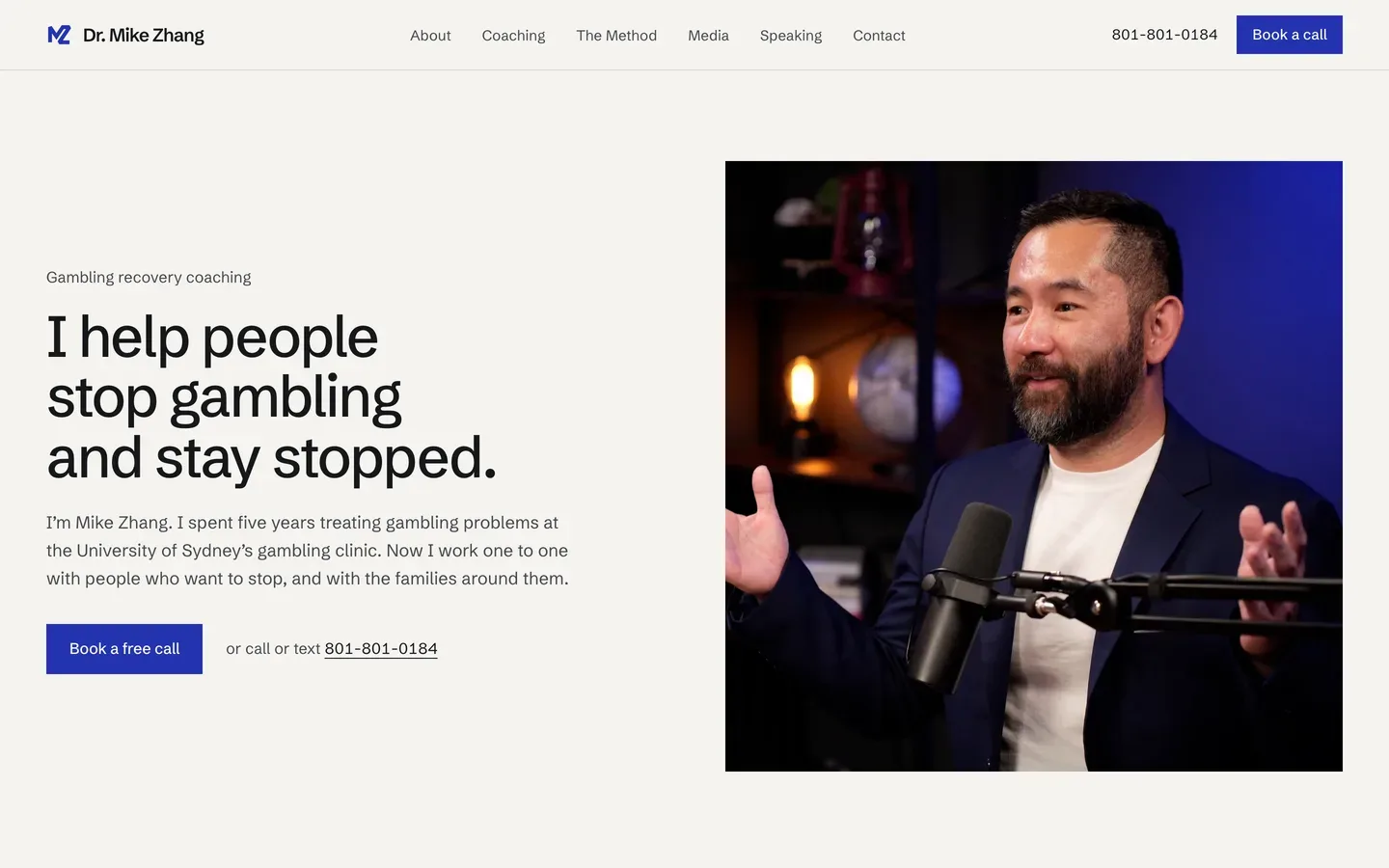
The speaking page then talks to an organiser rather than a client. It lists the places he has worked with or spoken at, and shows a dated card for his most recent talk, with the abstract one click away. A dated talk is proof a planner can check. The "Email me" button opens a message with the subject already filled in as "Speaking or consulting", so the enquiry arrives labelled and does not get lost among coaching emails.
Steal this: if speaking is not your main business, give it its own page and one clear link from the homepage, rather than mixing it into the main pitch. And prefill the subject line on your email link, so you can tell a booking from everything else at a glance.
The enquiry form, field by field
Put together, the forms above suggest a short list. Each field earns its place because it saves a round of emails:
| Field | Why it is there |
|---|---|
| Event date, or a rough one | Availability is the first yes or no |
| City and country, or virtual | Travel changes the fee and the diary |
| Format: keynote, workshop, panel | They are priced and prepared differently |
| Audience size and who they are | Decides which talk, and often the fee |
| Budget | Saves a call that was never going to work |
| Organisation and role | Tells you who is asking |
| How they found you | Shows whether bureaus, referrals or search are working |
Seven fields is plenty. A form much longer than this starts to feel like an application, and the planner comparing four speakers fills in the easiest one first.
Where speaker sites lose the booking
| What we see | What it costs |
|---|---|
| A speaking page with no video | The planner cannot judge the most important thing |
| Topics with no titles or outcomes | Nothing to put in front of the planner's boss |
| Only an email address | Every enquiry starts with three questions back |
| No sign of budget, published or asked | Calls with people who could never have paid |
| Speaking buried under another business | Planners leave before they find the page |
| A copyright line several years old | The diary looks empty even when it is full |
Where to start
Start with the step you are weakest at. For most speakers it is the last one: a real enquiry form in place of an email address. Then titles and outcomes for each talk, then a video for each.
For more personal sites beyond speakers, our personal website examples cover consultants, coaches and founders, and author website examples cover writers. If you would rather have it built, a speaking page with a proper booking path is part of our personal brand websites, and what that costs is in how much a custom website costs.

Nitesh Padghan
Founder, Storifex Media
I build websites that turn visitors into revenue, and rebuild the LinkedIn profiles that send people to them. Clients in six countries, most of them shipped in two weeks.
Connect on LinkedInRelated reading
- Personal websites
Author website examples: what six non-fiction authors do right
Six author websites from non-fiction and business writers, what each one does that most author sites do not, and the one idea worth taking from each.
Read - Personal websites
Personal website examples: what the good ones do differently
Seven personal sites from consultants, coaches, speakers and founders, what each one does that most do not, and the one idea worth taking from each.
Read - Redesigns and migrations
How to redesign a website without losing your search traffic
The redirect map is the whole job. A real migration off Squarespace, step by step: every source of old URLs, the pages crawls miss, testing the map, and the first fortnight.
Read